第九节:单元测试 -- controller -- save
我们在上节中学习对如何测试get请求。post的请求与get请求基本相同。
我们使用postMan来查看下,get与post生成的实际数据都有什么。
get:

post:
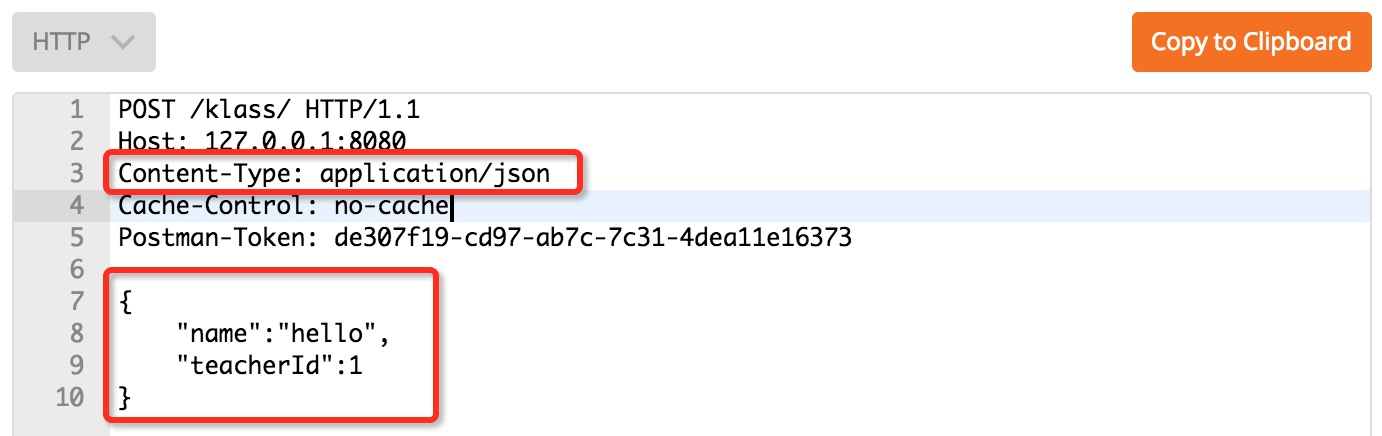
通过对上面两张图片的对比,不难发现,post与get除了请求方式不同外,还需要指定了一个content type类型,另外,还需要加入发送的json数据。
本节中,让我们共同学习SpringMVC是怎么解决这两点内容的。
content type
    @Test
    public void save() throws Exception {
        // 提交POST请求,并设置contentType
        this.mockMvc
                .perform(post("/klass/")
                        .contentType("application/json"))
                .andDo(print());
    }
测试:
MockHttpServletRequest:
      HTTP Method = POST
      Request URI = /klass/
       Parameters = {}
Headers = {Content-Type=[application/json;charset=UTF-8]}正如我们看到的一样,在调用contentType(),mockMvc在提交请示时,为我们设置了Content-Type的值,同时,还添加了系统的默认编码。
json 数据
在使用postMan的过程中,我们可以尝试点击body标签中的各个选项卡,并输入一些测试数据,最后查看code。你会发现,各个不同类型反映至最终发送的数据上,一是content type值不同,二就是发送数据的格式不同。但本质上,都是在发送普通字符串。

json数据也是特定格式的定符串。
比如我们增加班级信息时发送的数据为:{"name":"hello","teacherId":1}。mockMvc为我们提供了content()函数,用于发送主体数据。
    public void save() throws Exception {
        // 提交POST请求,并设置contentType
        this.mockMvc
                .perform(post("/klass/")
                        .contentType("application/json")
                .content("{\"name\":\"hello\",\"teacherId\":1}"))
                .andDo(print());
}\"用于转义",转义后,"将做为一个普通的字符串来处理。
测试:
MockHttpServletRequest:
      HTTP Method = POST
      Request URI = /klass/
       Parameters = {}
          Headers = {Content-Type=[application/json;charset=UTF-8]}

Handler:
             Type = com.mengyunzhi.controller.KlassController
           Method = public com.mengyunzhi.repository.Klass com.mengyunzhi.controller.KlassController.save(com.mengyunzhi.controller.KlassController$JsonInput)

Async:
    Async started = false
     Async result = null

Resolved Exception:
             Type = null

ModelAndView:
        View name = null
             View = null
            Model = null

FlashMap:
       Attributes = null

MockHttpServletResponse:
           Status = 200
    Error message = null
          Headers = {Content-Type=[application/json;charset=UTF-8]}
     Content type = application/json;charset=UTF-8
             Body = {"id":1,"teacher":null,"name":"hello"}
    Forwarded URL = null
   Redirected URL = null
          Cookies = []
完善测试代码
基本的用法学习后,我们完善测试代码。
注释:
    public void save() throws Exception {
        // 获取一个有效的教师

        // 提交JSON POST请求, 断言收到json数据,并存在id值
    }
添加代码:
import static org.hamcrest.Matchers.notNullValue;
    public void save() throws Exception {
        // 获取一个有效的教师
        Klass klass = klassService.getNewKlass();
        Long teacherId = klass.getTeacher().getId();

        // 提交JSON POST请求, 断言收到json数据,并存在id值
        this.mockMvc
                .perform(post("/klass/")
                        .contentType("application/json")
                        .content("{\"name\":\"hello\",\"teacherId\":" + teacherId.toString() + "}"))
                .andDo(print())
                .andExpect(jsonPath("$.id", notNullValue()));
    }
测试:

异常测试
在进行单元测试前,我们先回忆下使用postMan进行测试时可能发生的异常:
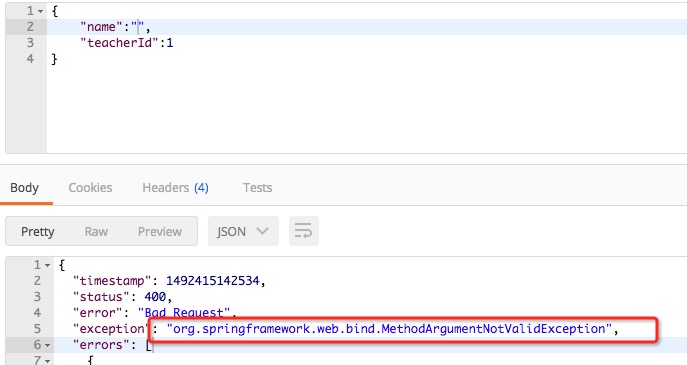
name为空发生的数据绑定校验异常:
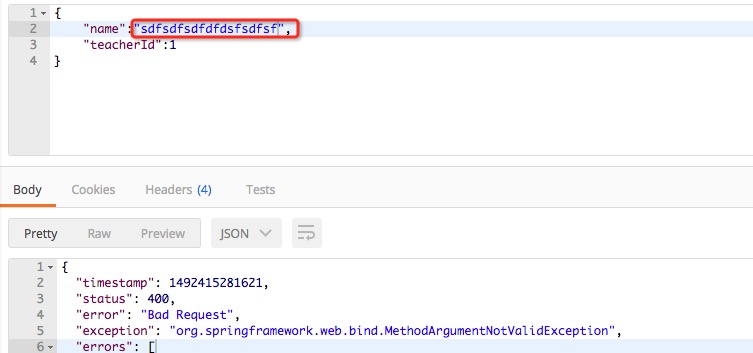
name过长发生的数据绑定校验异常:
缺少必要参数时发生的数据绑定校验异常:
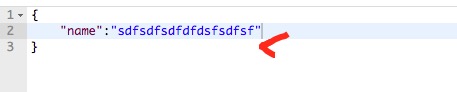
传入字符串非json格式时,发生的json数据读取异常:
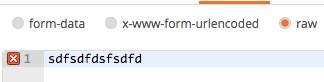


我们并不关心异常的具体类型,我们关心的是:当输入错误的信息时是否发生异常。通过观察不然发现,上述各个异常类型虽然不同,但返回的状态码均为400。没错,我们就是利用这个特点,来检测是否发生了用户请求的异常。
测试异常
班级名称为空:
    @Test
    public void saveWithNameEmpty() throws Exception {
        // 直接添加一个实体
        Klass klass = klassService.getNewKlass();
        Long teacherId = klass.getTeacher().getId();
        // 检测异常(用户名过短)
        this.mockMvc
                .perform(post("/klass/")
                        .contentType("application/json")
                        .content("{\"name\":\"\",\"teacherId\":" + teacherId.toString() + "}"))
                .andDo(print())
                .andExpect(status().is4xxClientError());
}代码分析:使用status().代表返回状态,is4xxClientError()代表断言是4xx的错误,比如400,401,402都属于4xx。
班级名称过长:
    @Test
    public void saveWithNameTooLong() throws Exception {
        // 直接添加一个实体
        Klass klass = klassService.getNewKlass();
        Long teacherId = klass.getTeacher().getId();

        // 检测异常(用户名过长)
        this.mockMvc
                .perform(post("/klass/")
                        .contentType("application/json")
                        .content("{\"name\":\"sdfsdfsdfsdfsdf\",\"teacherId\":" + teacherId.toString() + "}"))
                .andDo(print())
                .andExpect(status().is4xxClientError());
}除使用is4xxClientError()来判断是否发生4xx错误以外,我们还可以使得is(int status),如is(400)来判断发生的具体的状态码。还可以使用isNotFound()来判断是否发生404错误。Spring的官方API中,为我们总结了可用的断言方法:https://docs.spring.io/spring/docs/4.3.7.RELEASE/javadoc-api/org/springframework/test/web/servlet/result/StatusResultMatchers.html。
代码重构
当我们开始重复造轮子的时候,就应该思索自己是否应该马上进行代码重构了。
    private Klass klass;
    private Long teacherId;

    @Before
    public void before() {
        this.klass = klassService.getNewKlass();
        this.teacherId = klass.getTeacher().getId();
    }

    @Test
    public void save() throws Exception {
        String content = "{\"name\":\"hello\",\"teacherId\":" + teacherId.toString() + "}";

        // 提交JSON POST请求, 断言收到json数据,并存在id值
        this._save(content).andExpect(jsonPath("$.id", notNullValue()));
    }

    @Test
    // 检测异常(用户名过短)
    public void saveWithNameEmpty() throws Exception {
        String content = "{\"name\":\"\",\"teacherId\":" + teacherId.toString() + "}";

        this._save(content).andExpect(status().is4xxClientError());
    }


    @Test
    // 检测异常(用户名过长)
    public void saveWithNameTooLong() throws Exception {
        String content = "{\"name\":\"sdfsdfsdfsdfsdf\",\"teacherId\":" + teacherId.toString() + "}";

        this._save(content).andExpect(status().is4xxClientError());
    }

    // 新增数据
    private ResultActions _save(String content) throws Exception {
        return this.mockMvc.perform(post("/klass/")
                .contentType("application/json")
                .content(content))
                .andDo(print());
    }
总结
本节中,我们使用mockMvc进行模似post请求,并使用jsonPath("$.id", notNullValue())来对返回值是否为null进行断言;触发异常,并使用status().is4xxClientError()对发生的异常成功进行了断言。
| 参考: | StatusResultMatchers | MockMvc | ResultActions | MockMvcResultMatchers |